Best online COA courses in Madurai
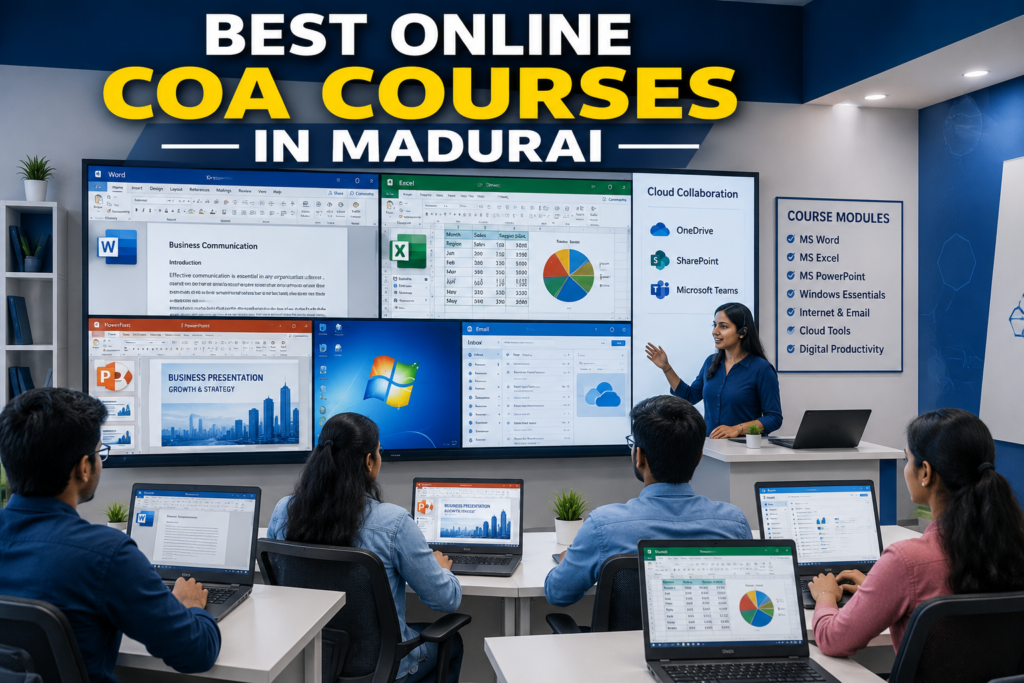
Basic computer knowledge won’t cut it anymore when you apply for a job. Employers expect you to build professional reports, manage digital documents, and navigate office software without hand-holding. That’s where Online COA Courses in Madurai come in. If you’re looking for job-oriented computer courses in Madurai, a Computer Office Automation (COA) program grounds you in the exact tools companies rely on every day. It works whether you’re a student, job seeker, working professional, homemaker, or business owner. This guide covers everything you need to know about Online COA Courses in Madurai with certificate, from syllabus and eligibility to fees, career paths, and institute selection. What is a COA (computer office automation) course? A Computer Office Automation (COA) course teaches you the software applications used across offices, schools, companies, and government departments. Best Online COA Courses in Madurai COA training focuses on hands-on skills so you can handle real office work right away. Typical COA course covers The goal is to get you ready for the workplace through direct computer practice. If you are starting from zero, taking a basic computer course in Madurai can help you build confidence before moving to advanced software tools. Why choose online COA courses in Madurai? Online classes mean you don’t have to commute across town every day to build office software skills. You learn straight from your laptop or desktop. Key advantages Benefit Explanation Learn from home Join live classes from anywhere with an internet connection. Flexible timings Pick morning, evening, or weekend batches. Recorded sessions Replay lessons whenever you need to review a concept. Practical assignments Work on real office tasks to build muscle memory. Affordable fees Online programs usually cost less than in-person classes. Certificate Earn an official completion certificate when you finish. Online learning fits well for: Who should join an online COA course in IPL Technologies? A Computer Office Automation course works for almost anyone who wants to build stronger computer skills. You don’t need any technical background to start. Ideal learners Eligibility for online COA courses in Madurai Getting into a COA program is simple, and the entry barrier is low. Basic eligibility Institutes follow national skill guidelines set by organizations like the National Skill Development Corporation (NSDC) and the Skill India Digital portal to keep training practical and industry-aligned. Many institutes also admit: What will you learn in IPL Technologies? Most Online COA Courses in Madurai with certificate cover core modules built specifically for daily office tasks. 1. Computer fundamentals Topics include: This setup helps beginners understand how computer hardware and software operate together. 2. Microsoft Word Microsoft Word is still the standard tool for office paperwork. Taking dedicated Microsoft Office training ensures you master these features quickly. You’ll learn to: Practical examples You’ll build actual office materials, such as: 3. Microsoft Excel Excel skills give you a massive edge in the job market. You can also study official documentation on Microsoft Learn to supplement your practice. Topics generally include: Practical applications 4. Microsoft PowerPoint Clear presentation skills keep teams aligned and clients interested. You can explore standard presentation templates directly through Microsoft 365 Training. You’ll learn: Course projects often focus on business decks and educational seminars. 5. Internet and email Offices run on fast, clear online communication. Topics include: 6. Digital office skills Many updated COA courses also cover: Employers expect you to handle these digital tools smoothly on day 1. Why is Microsoft Excel the most important skill? Master that in IPL Technologies. If there’s one application employers look for on every resume, it’s Excel. Excel helps you Even entry-level administrative jobs list Excel as a mandatory requirement. If you want to take your spreadsheet management further after this course, consider enrolling in advanced Excel training. Benefits of getting an online COA certificate Finishing Online COA Courses in Madurai with certificate gives you clear advantages when you apply for jobs. Better job opportunities Companies pick certified candidates because it proves you won’t need basic computer training on the job. Improved productivity You’ll finish routine office assignments faster and make fewer mistakes. Higher confidence When you know your way around spreadsheets and documents, job interviews and daily office tasks feel much easier. Foundation for advanced courses A COA background sets you up well for specialized programs such as: Career opportunities after a COA course A Computer Office Automation certificate opens doors to dozens of entry-level office roles. Common job roles Job role Primary responsibilities Office Assistant Documentation and administrative tasks Data Entry Operator Entering and managing digital records Computer Operator Daily computer operations Administrative Assistant Office coordination Receptionist Front office management Customer Support Executive Email and documentation support Back Office Executive Internal operations and reporting Local businesses, schools, hospitals, retail chains, logistics firms, and government contractors hire people with these exact skills every day. How to choose the best online COA course in Madurai Training programs vary in quality, so check these 6 details before you pay tuition fees. 1. Updated curriculum Make sure the syllabus covers current versions of Microsoft Office and modern web tools. 2. Practical training Hands-on practice matters much more than sitting through lectures. 3. Experienced trainers Look for instructors who have worked in actual office environments. 4. Live classes Interactive sessions let you ask questions and fix mistakes in real time. 5. Certificate Check that the institute issues a valid completion certificate you can put on your resume. 6. Placement assistance Good institutes help you format your resume and prep for job interviews. Common mistakes students make Watch out for these common missteps while taking your course. Learning only theory You can’t learn computer operations by reading books. You have to type and navigate the software yourself. Ignoring Excel practice Excel takes consistent practice to master. Don’t skip spreadsheet drills. Skipping assignments Assignments lock in what you learned and build your confidence. Not creating real projects Build actual invoices, letters, and presentation decks to test your skills. Forgetting keyboard shortcuts Shortcuts save hours of mouse clicking over a month of